Sileti logo Sileti
Now cross-platform — Windows & macOS

Your Clipboard,
Given a Voice.

The professional utility that instantly turns any copied text into natural-sounding audio. Rebuilt on a faster, lightweight engine — now on Windows and macOS, with Linux and mobile on the way.

macOS version coming to the Mac App Store soon.

Windows 10/11 macOS 11+ Linux — Coming soon Mobile — Roadmap
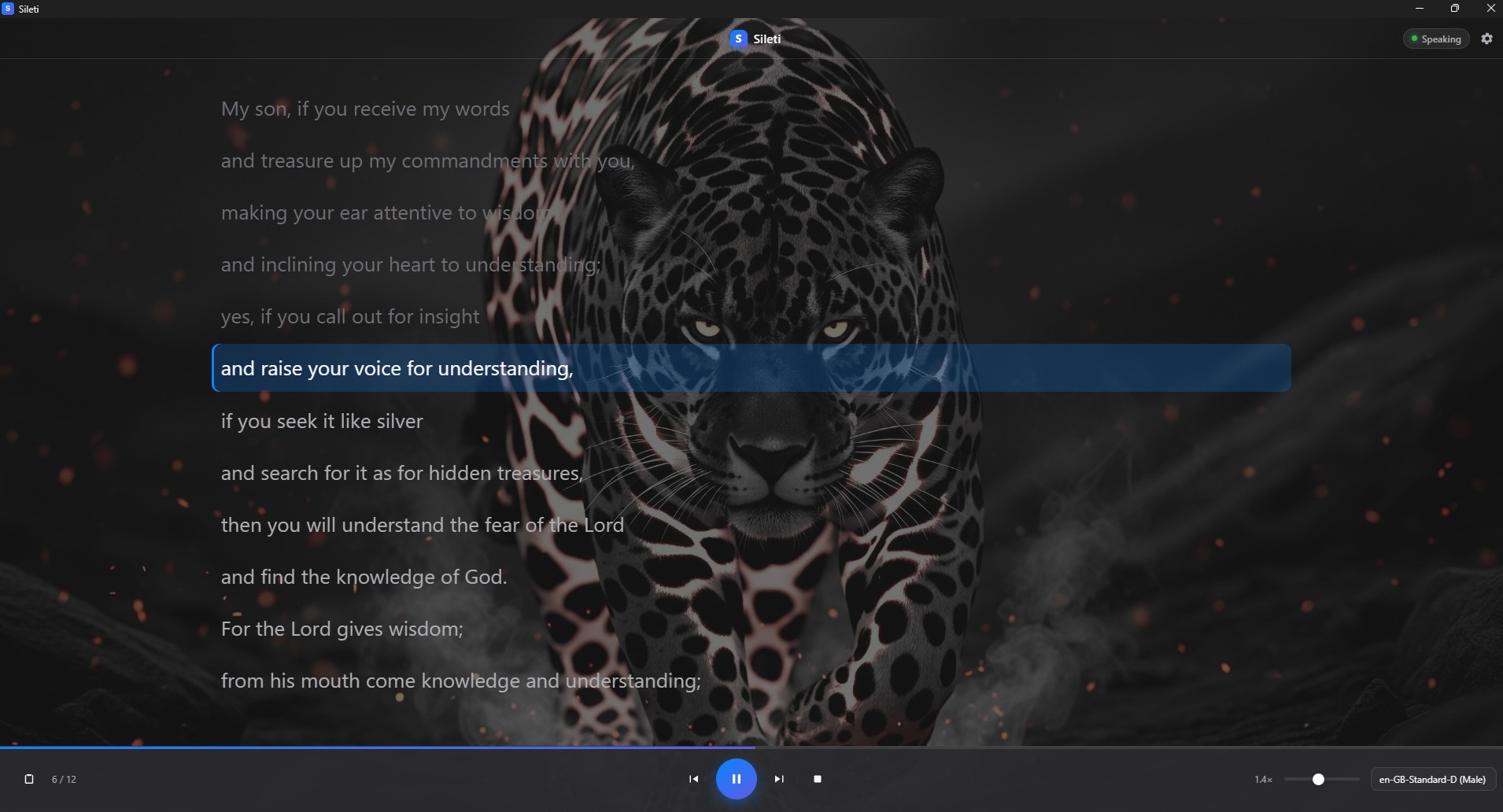
Sileti app running on a Windows 11 desktop, reading copied text aloud with sentence highlighting
Major Architecture Update

Rebuilt from the Ground Up

Sileti has been re-engineered on a lightweight engine for speed and efficiency. The result: a faster, smaller, cross-platform app that runs natively on Windows and macOS — with Linux and mobile on the roadmap.

🌐

Truly Cross-Platform

Native performance on every platform. Already running on Windows 10/11 and macOS 11+. Linux and mobile are on the roadmap — the new architecture makes it possible.

⚡

Lightweight & Fast

A tiny native binary with no heavy runtime. Sileti starts instantly and uses minimal system resources.

🎙️

Dual Voice Engines

Choose between built-in system voices (free) or Google Cloud TTS for high-quality neural and HD voices — includes a free tier. Both engines support full transport controls.

📖

Reader Window

Watch the text with the active sentence highlighted in real time. Follow along as Sileti reads, with play/pause, skip forward/back, and speed control (0.5x–2.5x).

🔒

Privacy-First Design

Clipboard text is read on demand and never persisted. Your Google API key stays on your machine, sent only to Google over HTTPS. No telemetry, no tracking.

📌

Stays Out of the Way

Lives in the macOS menu bar or Windows system tray. The window hides instead of quitting. Launch at login, trigger from anywhere with a global hotkey.

ℹ️

The previous version is still available

The previous version of Sileti remains available while all features are being migrated to the new architecture. Features currently being ported include automatic language detection for 20+ languages, additional voice engines, RSVP word display, word-by-word highlighting, and compact glass view. The new version already matches or exceeds the old one in speed, stability, and cross-platform support.

Core Features

Everything you need to turn text into speech, without the clutter.

⚡

Instant "Copy & Listen"

No opening files or pasting into text boxes. Just copy text and trigger Sileti via global hotkey. It reads whatever is on your clipboard instantly — from any app, anywhere on your system.

🎙️

Natural Neural Voices

Tap into high-quality, human-like system voices or upgrade to Google Cloud TTS for neural and HD voices — includes a free tier. Listen to long documents without the robotic fatigue.

🧠

Inclusive Design

Reduce cognitive load. A powerful productivity ally for users with dyslexia, ADHD, or visual processing needs. Text-to-speech on demand, without complexity.

Keyboard Shortcuts

Global Hotkeys (customizable)

Read Clipboard macOS
⌘ ⌃ ⇧ S
Read Clipboard Windows
Ctrl+Shift+Alt+S
Stop Playback Windows
Ctrl+Shift+Alt+X
Customize via Preferences

Reader Window

Space Play / Pause
→ Next sentence
← Previous sentence
Esc Stop

What's Coming

Features being migrated to the new architecture.

🌍

Automatic Language Detection

Auto-detect 20+ languages and select the best matching voice.

🎤

Additional Voice Engines

More voice engine options coming soon, including neural and HD voices.

👁️

RSVP Word Display

One-word-at-a-time rapid serial reading mode.

✨

Word-by-Word Highlighting

Per-word sync in the reader window, not just sentence level.

🪟

Compact Glass View

Minimal floating translucent reader UI.

Frequently Asked Questions

What is Sileti?

Sileti is a cross-platform utility that instantly converts any copied text into natural-sounding audio. Press a global hotkey and Sileti reads your clipboard aloud using system neural voices or Google Cloud TTS.

What platforms does Sileti support?

Sileti runs natively on Windows 10/11 and macOS 11+. The app has been rebuilt on a lightweight engine designed for cross-platform deployment, with Linux and mobile support on the roadmap.

What voice engines are available?

Two engines: built-in system voices (free, using macOS say or Windows SAPI voices) and Google Cloud TTS for high-quality neural and HD voices — includes a free tier. Both support full transport controls.

Is Sileti an accessibility tool?

Yes. Sileti helps reduce cognitive load and serves as a productivity ally for users with dyslexia, ADHD, visual impairments, or visual processing needs. Text-to-speech on demand, without complexity.

What happened to the old version?

The previous version of Sileti remains available while all features are being migrated to the new architecture. The new version is faster, lighter, and cross-platform — features like auto language detection and additional voice engines are being ported now.

Is my data private?

Yes. Sileti is privacy-first. Clipboard text is read on demand and never persisted. If you use Google Cloud TTS, your API key is stored locally and sent only to Google over HTTPS. No telemetry, no tracking.